
Gettobet App and Mobile Version
There are three ways onto Gettobet from a phone: the browser, a home-screen shortcut and an Android file. This guide covers the security side of each, the installation steps and what to do when something does not work.
18+ · Play responsibly
The Gettobet app experience brings the sportsbook, casino and cashier of the desktop site to a phone screen. Most of the platform’s players are in Turkey, and there are three ways in: logging in directly in the mobile browser, adding a home-screen shortcut (PWA) on iPhone or Android, and installing the Android-only gettobet apk file from the site’s own link. This guide explains where the file should come from, which permissions it asks for and where installation tends to get stuck. Only adults aged 18 or over may open an account. If gambling on the phone starts to feel out of control, free help is available from GambleAware at begambleaware.org or on 0808 8020 133.
Gettobet Mobile Version Overview
The mobile interface uses the same account as the desktop: balance, open bets, bonus progress and transaction history are identical on every device. The only thing to do on a new device is log in; no separate mobile account is created. Most people looking for a Gettobet app download actually mean one of these three routes — not a store app, but a browser-based shortcut or the Android file.
On the date of this guide, it could not be confirmed that any app of the same name in the official stores belongs to the platform. A store app that asks for login details can lead to an account being taken over, so mobile access should always start from the site itself. A Gettobet casino app installed from an unknown source is the single biggest mobile risk covered on this page.
APK Safety and Permissions
Because the Android file is installed outside an app store, the user has to do the safety checks. The most important rule is simple: open the gettobet download link only from the site’s own menu. Files circulating on forums, social media or file-sharing sites may have been modified to capture login details or SMS codes. Before putting the Gettobet android file on a phone, it also helps to make sure the device has a recent security patch, which limits the damage any malicious code could do.
During installation, Android asks for permission to “install unknown apps” from the browser. Keep that permission switched on only for the installation and turn it off again in the settings once it is finished. The permissions the app requests while running should be checked too:
| Permission | Needed? | Note |
|---|---|---|
| Internet access | Yes | Required to load games and odds |
| Notifications | Optional | Promotion and account alerts; can be turned off |
| Contacts | No | A gaming app has no reason to read your contacts |
| Read SMS | No | If requested, cancel the installation |
| Location | No | Not needed for any game function |
The version matters as well. An old version may fail to connect to the current domain; when a new release is published, uninstall the old app and download the file again. The file name and size can be compared with what the site states, but because those details are not always published, the real safeguard is the source. If Google Play Protect shows a warning after the download, check where the file came from before going any further. For Gettobet ios users, none of the file rules apply: iPhones use a Safari shortcut, and no permission setting is involved.
Mobile Data and Battery Use
Data and battery use on mobile depend mostly on what is being played.
| Activity | Data use | Battery use |
|---|---|---|
| Building a pre-match bet slip | Low | Low |
| Slot games | Medium (high on first load) | Medium |
| Live betting screen | Medium | Medium |
| Live casino and match streams | High | High |
Live casino and match streams use video, so they can drain a mobile data plan quickly. For long sessions, Wi-Fi is the better choice, and stream quality is best set to low rather than automatic.
Battery-saving modes can slow down live odds refreshes. Switching the mode off during live betting or live casino makes the screen update more smoothly. Notifications cost battery too: keeping only account and withdrawal alerts and turning promotional alerts off saves both battery and attention. Closing the app or the browser tab at the end of a session is the right move for battery life and for security. A Gettobet apk download installed on Android may use slightly more battery than the browser because it runs a notification service in the background.
Mobile Troubleshooting
Most mobile problems come down to a handful of typical causes. The table below covers the ones seen most often:
| Problem | Likely cause | Fix |
|---|---|---|
| APK will not install | Unknown-apps permission is off | Allow it temporarily for the installation |
| “Problem parsing the package” | Incomplete download | Delete the file and download it again from the site |
| App will not open | Old version, changed domain | Uninstall and install the current file |
| App keeps closing | Low memory, full cache | Clear the cache and restart the device |
| Shortcut opens the old address | PWA tied to the old domain | Delete the shortcut and add it again from the current address |
| iPhone shortcut does not open full screen | Added from a browser other than Safari | Open the site in Safari and add the shortcut again |
| Game does not load | Weak connection | Switch to Wi-Fi or choose a lower quality |
If the problem persists, give live chat the device model, the Android or iOS version and a screenshot of the error. Saying which route is being used — browser, shortcut or file — helps support find the cause quickly. For anyone using Gettobet mobile access through the browser only, clearing the browser cache solves a surprising share of loading problems.
When the download link on the site does not work, support can send the current one; never look for the file on other sites. A Gettobet download that comes from anywhere other than the site’s own menu should be treated as unsafe, however convincing the page looks.
Fast Deposits from Your Phone
The mobile cashier shows the same methods as the desktop: bank transfer, cryptocurrencies (USDT, BTC) and the e-wallets listed in the cashier.
A crypto deposit on a phone means switching between a wallet app and the Gettobet app. Copying the address and choosing the right network are the critical steps: if the cashier shows TRC20 for USDT, the same network must be selected in the wallet. For bank transfers, the reference code shown in the cashier must be entered in full so the deposit can be matched to the account. Saved payees in a mobile banking app should not be reused — take the account details from the cashier for each transaction, because they can change.
If the balance has not updated after a deposit, contact live chat with the receipt and the date. Players who skip the Gettobet app download and use only the browser get exactly the same cashier screen and steps; the only difference with the installed app is that payment notifications arrive directly on the phone. The full steps are in the payments guide.
Mobile Browser vs PWA App
Each of the three routes has advantages and limits. Which one to choose depends on the device and on how often the site is used:
| Feature | Mobile browser | PWA shortcut | Android APK |
|---|---|---|---|
| Installation | None | Add to home screen | File download and permission |
| Updates | Automatic | Automatic | New version installed manually |
| Domain change | New address opened manually | Shortcut added again | Updated inside the app or by downloading the new version |
| Notifications | None | Depends on the device | Yes (if allowed) |
| Storage | None | Minimal | Size of the app |
| iPhone support | Yes | Yes | No |
For someone who builds a bet slip now and then, the browser is enough. For a daily player, the shortcut is more practical because it opens from the home screen with one tap. The Android file suits players who want notifications, at the cost of keeping track of updates. A Gettobet casino app installed through any of these routes uses the same account details and balance.
It is also possible to switch between the app and the browser: a session opened on one device does not close another, but on shared devices remember to log out. Trying the browser for a few days before installing anything shows which sections are used most — someone who only bets on football may never need more than the shortcut.
Gettobet Android Installation Steps
Installing on Android takes a few minutes. The steps below are broadly the same on Android 8 and later; menu names may differ slightly between manufacturers.
- 01
Open the site
Open the current address in Chrome and go to the mobile app section in the menu.
- 02
Download the file
Tap the Android download link; the file is saved to the Downloads folder.
- 03
Allow installation
If prompted, allow the browser to install unknown apps.
- 04
Install
Tap the downloaded file and press Install.
- 05
Turn the permission off
Switch the unknown-apps permission off again in the settings.
- 06
Log in
Open the app and log in with your existing username and password.
The most common mistake is downloading the file from a site found in search results; the source should always be the site’s own menu. If the gettobet apk download button is missing from the site’s menu, the address may have been opened incorrectly — take it again from an official channel. After installation, the app icon appears on the home screen, and on first launch the app asks for login details before showing the home page. Whether to allow notifications is up to the user.
Gettobet on iOS (iPhone) Guide
No file is offered for iPhone, because Apple does not allow apps to be installed outside the App Store. Instead, Safari’s “Add to Home Screen” feature is used. The shortcut opens the site full screen and looks no different from an app.
- 01
Open Safari
Open the current address in Safari; in Chrome or other browsers the option may behave differently.
- 02
Tap Share
Tap the square-and-arrow icon at the bottom of the screen.
- 03
Choose Add to Home Screen
Scroll down the list and tap Add to Home Screen.
- 04
Confirm the name
Check the shortcut name and tap Add.
- 05
Open from the shortcut
Tap the icon on the home screen and log in.
The Gettobet ios shortcut keeps opening the old address after a domain change. In that case, delete the old shortcut, open the new address in Safari and add the shortcut again. On iPhone, never accept requests to install a “profile” or “certificate” from pages that promise an app; such profiles gain wide permissions on the device.
Mobile Casino Interface Review
The main menu opens from the three-line icon at the top left; sports, live betting, casino, live casino and promotions are selected there. The navigation bar at the bottom gives one-tap access to the home page, casino, sign-up, bonuses and the cashier. The round button at the bottom right opens live chat.
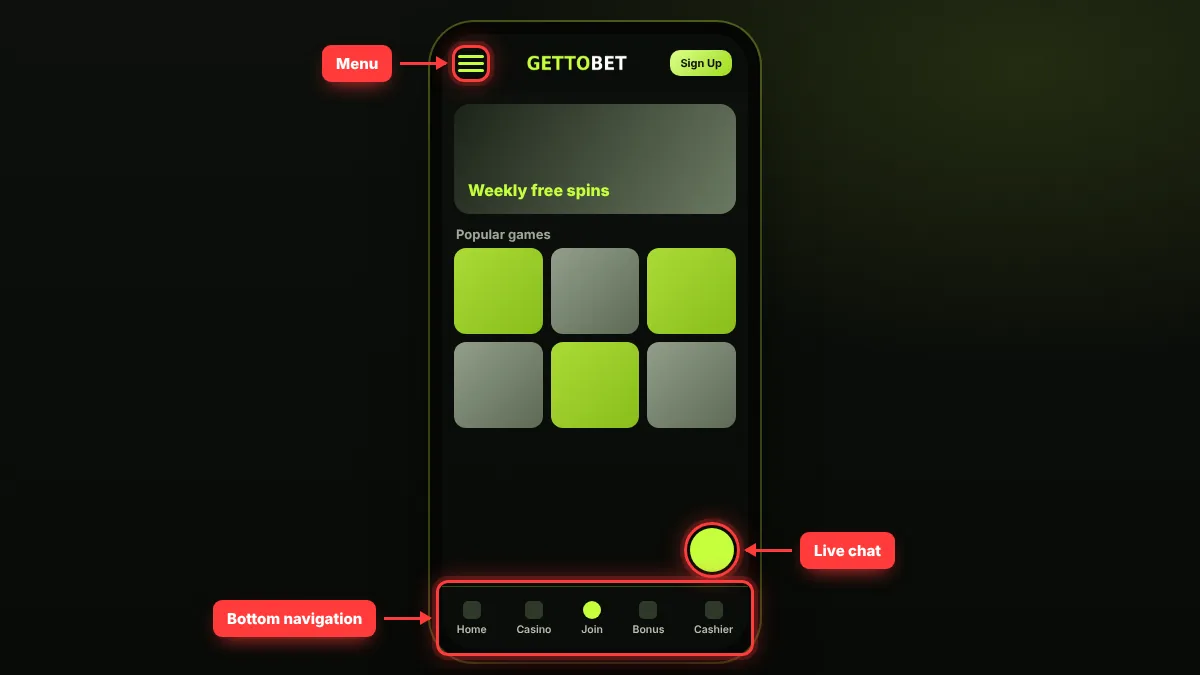
In the casino lobby, the search box and filters are the same as on desktop: provider, game type and popularity. Slots can be played in portrait mode, although some older games look better in landscape. Live casino tables open full screen on a phone, with the betting area at the bottom. The Android app uses the same menu structure; the difference is that notifications arrive through the app. On the iPhone shortcut, the menu opens in Safari’s full-screen view and the address bar is hidden, so the domain check should be done before adding the shortcut.
Favourites and recently played lists make it easy to return to frequently used titles. Because the screen is small, check the stake before confirming a bet to avoid accidental taps. The interface language can be changed in the account settings, and the choice is saved at account level, so the desktop shows the same language. A dark theme reduces eye strain and lowers battery use on OLED screens. The view inside the Android file and the browser view are practically identical, so switching between them does not require learning a new layout. A Gettobet app download is therefore a matter of convenience rather than features, and the Gettobet mobile browser version remains a complete alternative; any later gettobet download of a newer file keeps the same layout.
Live Betting on Mobile
The live betting screen in the Gettobet casino app updates odds within seconds on a phone as well, just as it does in the browser. On a weak connection, updates may lag and an “odds changed” warning can appear while confirming a bet slip, so live betting is best done on Wi-Fi or a strong mobile signal.
Where partial or full cash-out is offered, the button appears under the bet slip. The amount changes with the odds and the state of the match, so check the final figure before pressing it. Open bets are listed in the “My Bets” section after logging in; a slip prepared on desktop can be followed on the phone, and the same applies the other way round. Saving a bet slip is useful too: a slip prepared before kick-off can be saved and confirmed with one tap when the moment comes. If one match in an accumulator is suspended, the slip will not be accepted; remove the suspended match and confirm again.
Live betting brings pressure to decide quickly, and on a phone that pressure grows because the app is always within reach. The deposit and session limits in the account settings are the most effective tools here; breaks and self-exclusion are explained on the responsible gaming page.
FAQ
Is there a Gettobet app?
There is an APK file for Android, downloaded from the site’s own link, and a home-screen shortcut for iPhone added through Safari. On the date of this guide, an app belonging to the platform on Google Play or the App Store could not be confirmed.
Where can I download the Gettobet APK?
Download the file only from the mobile app section at the site’s current address. Files on forums or file-sharing sites may have been modified and can capture login details and SMS codes, so avoid them completely.
How do I use Gettobet on iPhone?
Open the site in Safari, choose Add to Home Screen from the Share menu and confirm the shortcut. It opens full screen like an app; after a domain change, delete the old shortcut and add it again from the new address.
Are all games available on mobile?
Most slots, live casino tables and sports markets open on mobile. Some older games look better in landscape; mobile support for a specific game is shown on the game card or in the provider’s info menu. The Gettobet android file and the browser offer the same lobby.
Does the mobile app need a separate account?
No. Every route — browser, shortcut or Android file — uses the same account and balance as the desktop. On a new device, simply log in with your existing username and password; opening a second account breaks the rules.
How do I update the APK?
When a new version is released, uninstall the old app and download the file again from the site’s link. Allow unknown-app installation only temporarily and switch it off once the update is done. Gettobet ios shortcuts update automatically, because they always load the live site.
In short, the safest order for mobile access is: open the site in the browser first, add a shortcut if it is used often, and install the Android file only from the site’s own link if notifications are wanted. The Gettobet app uses the same account as the desktop, so limits and security settings apply on every device. Gambling is for adults aged 18 and over. The information in this guide is accurate as of 10 November 2026.