

Gettobet Login and Registration Guide
Opening an account takes a few minutes; keeping it safe takes ongoing attention. This guide walks through the registration form, verification codes, password recovery and the ways to pause or close an account.
18+ · Play responsibly
The Gettobet login process covers two separate things: registration for new players and signing in for existing ones. Because the platform’s domains are blocked in Turkey from time to time, the real difficulty is usually not the form but finding the right address — which is why Gettobet registration guides and address checks belong on the same page. There is no login form on this page and no user data is collected here; enter your details only on the site itself. Only adults aged 18 or over may open an account. If gambling stops being fun, free and confidential help is available from GambleAware at begambleaware.org or on 0808 8020 133.
Accessing Your Gettobet Account
Access requires only a few details: a username or email address and a password. New players find the Gettobet sign up button in the top right corner of the home page, and existing players use the Log In button next to it. The Gettobet casino login uses the same details as the sportsbook, because both sections share one account and one balance.
The account is tied to the user, not to a domain. When the address changes, the username, password, balance and open bets stay exactly the same; there is no need to register again on a new address, and doing so breaks the rules. The only thing to do after an address change is make sure the new link really belongs to the platform. To log in on the new address, the Gettobet log in button works exactly as before.
- 01
Check the address
Take the link from the latest notification in your registered email, the pinned message of the official Telegram channel or live chat.
- 02
Tap Log In
The button in the top right corner opens the login window.
- 03
Enter your details
Type your username or email and password; check the keyboard language and Caps Lock.
- 04
Confirm the code
If an extra check is requested, enter the code sent by SMS or email.
- 05
Check the session
Make sure your username and balance appear in the top right corner.
Login with a Verification Code (2FA)
A verification code acts as a second key next to the password: even if the password is stolen, the account cannot be opened without the code. During registration and password resets, a one-time code is sent by email or SMS. If the option is visible, switching it on is strongly recommended. Anyone who has just completed the Gettobet register step should check this setting right after the first login.
When signing in from a new device or on a new address for the first time, the system may ask for an extra code. If the code does not arrive, work through this order:
- Waiting time: SMS messages can be delayed by a minute or two; requesting the code repeatedly invalidates earlier ones.
- Phone and email: Check that the number and email on the account are current.
- Spam folder: Codes sent by email can end up in the spam folder.
- Carrier filters: Some carriers filter short-code messages; try the email option instead.
- Support: If the code still does not arrive, live chat can help after verifying your identity.
The verification step on the Gettobet sign in screen cannot be skipped — this is not a fault but a protection for the account. When the phone number changes, codes may keep going to the old number, so update it promptly through the account settings or support. If logging in from abroad, make sure SMS roaming is active; otherwise email is the only option. Verification codes must never be shared. A message from someone claiming to be support and asking for a code is an attempt to take over the account; genuine support never asks for codes or passwords.
Closing or Freezing an Account
An account can be frozen temporarily or closed permanently. These requests are made in the responsible gaming section of the account settings or through live chat. The options usually come in three levels:
- Break: Blocks logging in and depositing for a period from one day to several weeks.
- Self-exclusion: A longer or permanent restriction that cannot be lifted before it ends.
- Account closure: Ends the account completely.
Before closing, pending withdrawals must be completed and the balance brought to zero. It is against the rules for a self-excluded player to open a new account as the same person, and the new account may be closed as well. During a break, it is also possible to ask for promotional emails to stop, which fits the purpose of the break. A permanently closed account is not reopened, so a break is worth considering before making that decision. The break and self-exclusion tools are designed for players who feel that gambling is getting out of control; details are on the responsible gaming page.
Password Reset and Account Recovery
Resetting a password starts with checking the address: do not send a reset request until the current domain has been confirmed through an official channel. If the password is forgotten, use the “Forgot password” link on the login screen. After entering the registered email or phone number, a new password is set using the link or code that arrives. Open the reset link only on a page whose address has been verified; if the link in the email points to a different domain, do not click it.
If the reset email does not arrive, check the spam folder and confirm that the registered email is spelled correctly. If there is no longer access to the registered email, support may ask for an identity document and recent transaction details to confirm ownership. This can take a few days; documents uploaded in advance speed up recovery.
A new password should have at least twelve characters, mix letters, numbers and symbols, and not be used on any other site. After changing it, closing sessions on other devices is recommended. A password manager helps here: it generates long passwords and fills them in only on the saved domain, which is also an early warning when a fake page appears.
Common Login Errors
Most errors at login have a handful of typical causes. Entering details on the first page that appears in a search is the most dangerous of them; the others are usually fixed in a few minutes. The table below covers the ones that come up most often for the Gettobet casino login and the sportsbook alike:
| Error | Likely cause | Fix |
|---|---|---|
| Page will not open | Old or blocked address | Take the current link from an official channel |
| “Wrong password” | Caps Lock, keyboard language | Type the password visibly or reset it |
| Account locked | Several wrong attempts in a row | Wait a while or contact support |
| Code does not arrive | SMS delay, spam folder | Wait, try the email option |
| Session closes immediately | Browser blocking cookies | Allow cookies, clear the cache |
| Blank screen after login | Old cache | Clear the browser cache |
The platform’s real login page always opens over an encrypted connection with a padlock icon. If the browser warns that the connection is not secure, do not enter any details. When an account is locked after several wrong attempts, the lock usually lifts by itself after a while; repeated attempts during that time can extend it. If something urgent needs doing, live chat can be asked to remove the lock and confirm that the Gettobet account itself is in order.
Browser extensions can also cause trouble: ad blockers or automatic translation extensions may break the login window. Opening the page in a private window quickly shows whether an extension is to blame. If the error continues, a screenshot, the time and the device used help live chat solve it faster. A Gettobet log in that keeps failing on one browser but works on another almost always points to cached data or an extension.
KYC Identity Verification Steps
KYC — “know your customer” — confirms that the account belongs to the person who filled in the form. Only basic details are needed for Gettobet registration; identity documents are usually requested before the first withdrawal, and in some cases once deposits reach a certain amount. That is why players who finish the Gettobet register form and deposit straight away are sometimes surprised by a document request at the payout stage.
The documents usually requested are:
- Identity document: Front and back of an ID card or passport.
- Proof of address: A utility bill or bank statement issued within the last three months.
- Proof of payment method: A document showing the bank account or wallet belongs to the account holder.
- Selfie: In some cases, a photo of the player holding the document.
Upload documents only through the verification section of the account menu; sending identity photos through chat or social media spreads personal data unnecessarily. Photos should be taken on a flat surface, in daylight, with all four corners visible; glare or cropped edges are the most common reasons for rejection. If a document is rejected, read the explanation and upload only the document requested.
Once documents are approved, the account shows a “verified” status and withdrawals are no longer held for this step. A change of address or payment method may trigger a new request, handled through the same upload section. Approved documents stay on the account when the domain changes, so they do not need to be uploaded again.
How to Verify the Current Gettobet Address
Periods when the address changes are exactly when fake pages appear most. They copy the real design and exist only to collect login details. These checks show whether a link belongs to the platform:
- 01
Source check
Did the link come from your registered email, the pinned message of the official Telegram channel or live chat?
- 02
Domain check
Does the domain in the address bar match the announced address letter by letter?
- 03
Connection check
Is there a padlock and an encrypted connection at the start of the address?
- 04
Content check
Does the page push urgent messages such as “log in now for an exclusive bonus”?
Once the address has been verified, bookmarking it lets the next Gettobet sign in happen without a search engine. When the address changes again, update the bookmark as well.
Different domains may also circulate on social media. The most reliable source is always the registered email, because only the account holder receives it.
Filling In the Registration Form
The Gettobet sign up form fits on one screen and takes a few minutes. The highlighted fields are email and phone (verification codes go here), a strong password, the account currency and the confirmations for age 18+ and the terms of use. Personal details must be entered exactly as written on the identity document; otherwise the pre-withdrawal check will run into problems.
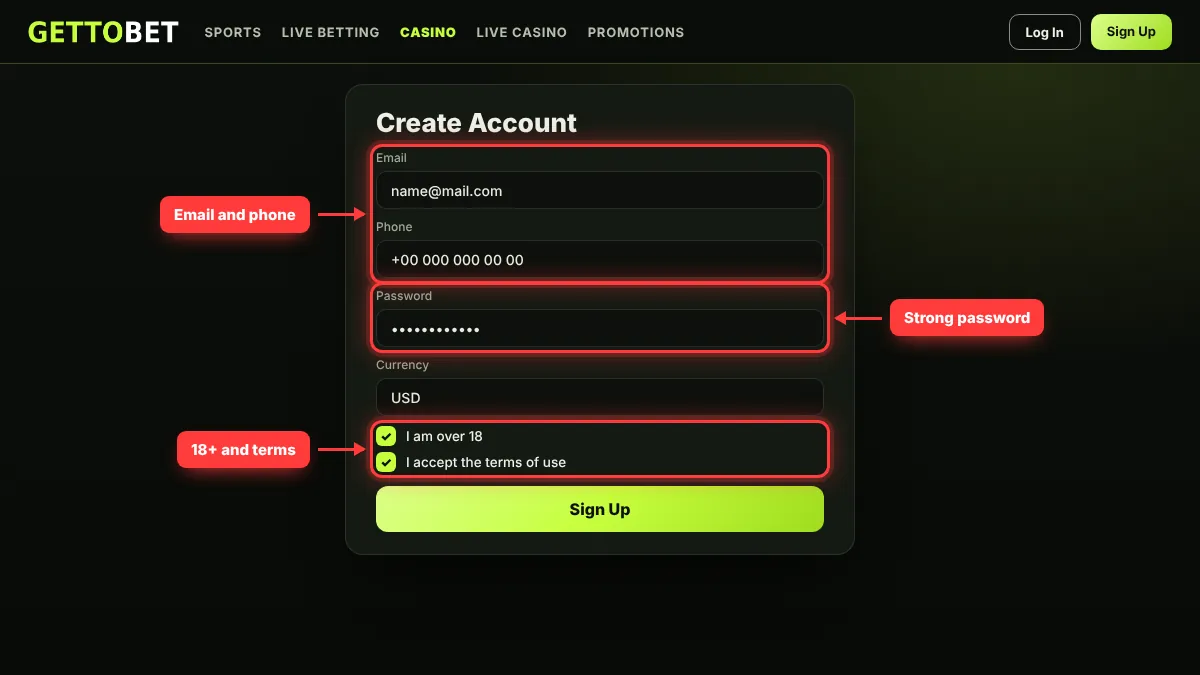
- 01
Tap Sign Up
The button in the top right corner opens the registration form.
- 02
Enter contact details
The email address and phone number are used for verification codes.
- 03
Choose a password
Pick a password of at least twelve characters that is not used anywhere else.
- 04
Select the currency
The chosen currency may not be changeable later.
- 05
Tick the confirmations
Confirm that you are over 18 and accept the terms of use.
- 06
Activate the account
Enter the code sent by email or SMS to complete registration.
A referral or promo code field may appear during registration. Enter only codes that appear in official promotion rules; codes distributed on third-party sites are often invalid. Choosing a bonus during registration is optional and can also be done at the first deposit.
The most common mistake on the form is shortening the first or last name or using a nickname. This information is compared with the identity document before a withdrawal, and a mismatch holds up the payout. Date of birth and phone number are checked the same way. After registration, some of these fields can be changed only through support. Once the form is complete, the same email or username and password are all that the Gettobet login needs from then on.
Safe Login on Desktop and Mobile
Logging in works with the same details on a computer and a phone; the only difference is that on mobile there is a choice between the browser, a home-screen shortcut and the Android file. A safe session depends on a few habits:
- Password manager: It fills in passwords only on the saved domain; if it does not fill in on a page, treat that as a warning sign.
- Public networks: Avoid logging in on open Wi-Fi in cafés or hotels, or use mobile data instead.
- Shared devices: Do not tick “remember me” on someone else’s computer, and always log out.
- Session history: If the account settings show login history, report any unrecognised session immediately; it is the quickest way to spot that a Gettobet account has been opened from somewhere else.
- 01
Open the menu
Tap your username in the top right corner or the mobile menu icon.
- 02
Choose Log Out
The session closes on this device only.
- 03
Check other sessions
If there is a suspicious login, change the password and contact support.
Installation and troubleshooting for mobile access are covered in the mobile guide. If a phone used for the Gettobet casino login is lost, the first step is to change the password from another device and ask support to close open sessions.
Activating the Welcome Package
The welcome package is usually activated at the first deposit by selecting it from the offer list in the cashier. If no offer is selected, the balance stays as cash, and adding the same offer later is often not possible. The package may include separate casino and sports offers; which one to choose depends on how the player intends to play.
Three points should be checked before activating it: the wagering requirement, the maximum bet rule and the deadline. Promotions are updated frequently and news appears on the Telegram channel first, so the binding version is always the current text on the promotion card in the cashier. After the Gettobet register step and the first deposit, bonus progress is tracked in the bonus section of the account menu. Offer types, a worked wagering example and cancellation rules are explained on the bonus page.
Taking a bonus is optional. For players who play for short periods or want to withdraw winnings quickly, depositing without a bonus is often the simpler choice, because no wagering applies and winnings can be withdrawn directly.
FAQ
Why is the Gettobet login page not opening?
The most common cause is an old or blocked address. Take the current link from your registered email, the pinned message of the official Telegram channel or live chat, then clear the browser cache, open the page again and use the Gettobet log in button.
How do I register at Gettobet?
Tap the Sign Up button in the top right corner to open the registration form. Enter email, phone, password and personal details exactly as on your ID, confirm age 18+ and the terms, then activate the account with the code sent by email or SMS.
What if I forgot my password?
Use the Forgot password link on the login screen to request a reset link to your registered email or phone. If you no longer have access to the email, live chat helps after confirming ownership with identity and recent transaction details.
How long does verification take?
Complete, readable documents speed up the process, and the status is shown in the verification section of the account menu.
Do I need to register again when the address changes?
No. The account is tied to the user, not to the domain, so you log in on the new address with the same username and password. Opening a second account breaks the rules.
What should I do if the verification code does not arrive?
Wait a few minutes, check the spam folder and make sure the registered number is current. If the code still does not arrive, try the email option or ask live chat for help.
In short, three rules protect an account: take the link only from official channels, never share verification codes, and upload documents before the first withdrawal. Gettobet registration and the Gettobet sign up form are quick, but account security depends on the player’s own habits — using a password that appears on no other site and completing every Gettobet sign in only on a verified address come first. Gambling is for adults aged 18 and over. The information in this guide is accurate as of 10 November 2026.